I have a lot of (bad) experiences with WPVivid backup + offsite cloud storage on all possible different cloud storage provider.
Therefore it’ll take quite a bit of time to test MainWP backup process as I just have seen so much over the years.
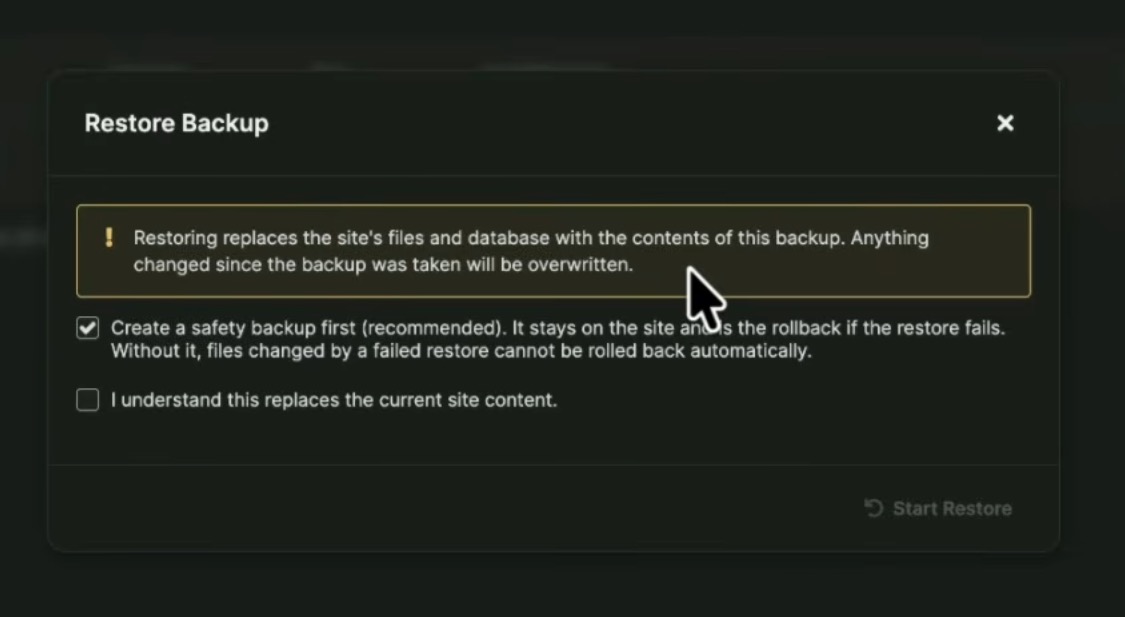
One thing I immediately question, when watching the video guide is the restore process.
Plugin solutions work quite differently in that regard, e.g. Updraft only allows to restore and overwrite (which in my opinion will lead to chaos as previous and current state get merged). WPvivid allows to delete files/db first and do a clean restore.
Especially when it comes to infected sites a full deletion of files/DB is mandatory before restoring a site.
How does that work with MainWP’s new native backup feature?
MainWP’s built-in restore does more than overwrite files, but it doesn’t delete the entire site and database before restoring.
It restores the backed-up files, then compares the site against a file inventory saved automatically with the backup. Files that aren’t in that inventory are removed within the backup’s scope.
That deletion step has exceptions, including:
wp-config.php and wp-content/object-cache.php
MainWP Child and MainWP’s data/backup folders
Existing mu-plugins files missing from the backup
Excluded paths, symbolic links, and certain configuration dependencies
If the backup’s file inventory is unavailable, the additional-file cleanup is skipped and MainWP displays a warning.
For the database, tables included in the backup are replaced rather than merged with their current contents. Existing tables that aren’t included in the backup are not automatically deleted.
So, for the infected-site scenario you mentioned, we wouldn’t describe this as a complete wipe or a guaranteed malware cleanup.
Thanks for explaining. Would you consider discussing that “full delete and full restore” along the road? I think these days dealing with compromised sites will be part of regular business tasks and doing a full swipe can therefore be an important step in some scenarios
Yep, that’s something we can consider. Please feel free to submit the full delete-and-restore option on MainWP Voice, so others can vote and share their use cases too.
WordPress® is a registered trademark of the WordPress Foundation, and WooCommerce® is a registered trademark of WooCommerce, Inc. MainWP is an independent product and is not affiliated, associated, or endorsed by the WordPress Foundation, WooCommerce, Inc., or Automattic Inc., except where noted under the Jetpack® API and Trademark License Agreement. All product names, logos, and brands are property of their respective owners and are used for identification purposes only.