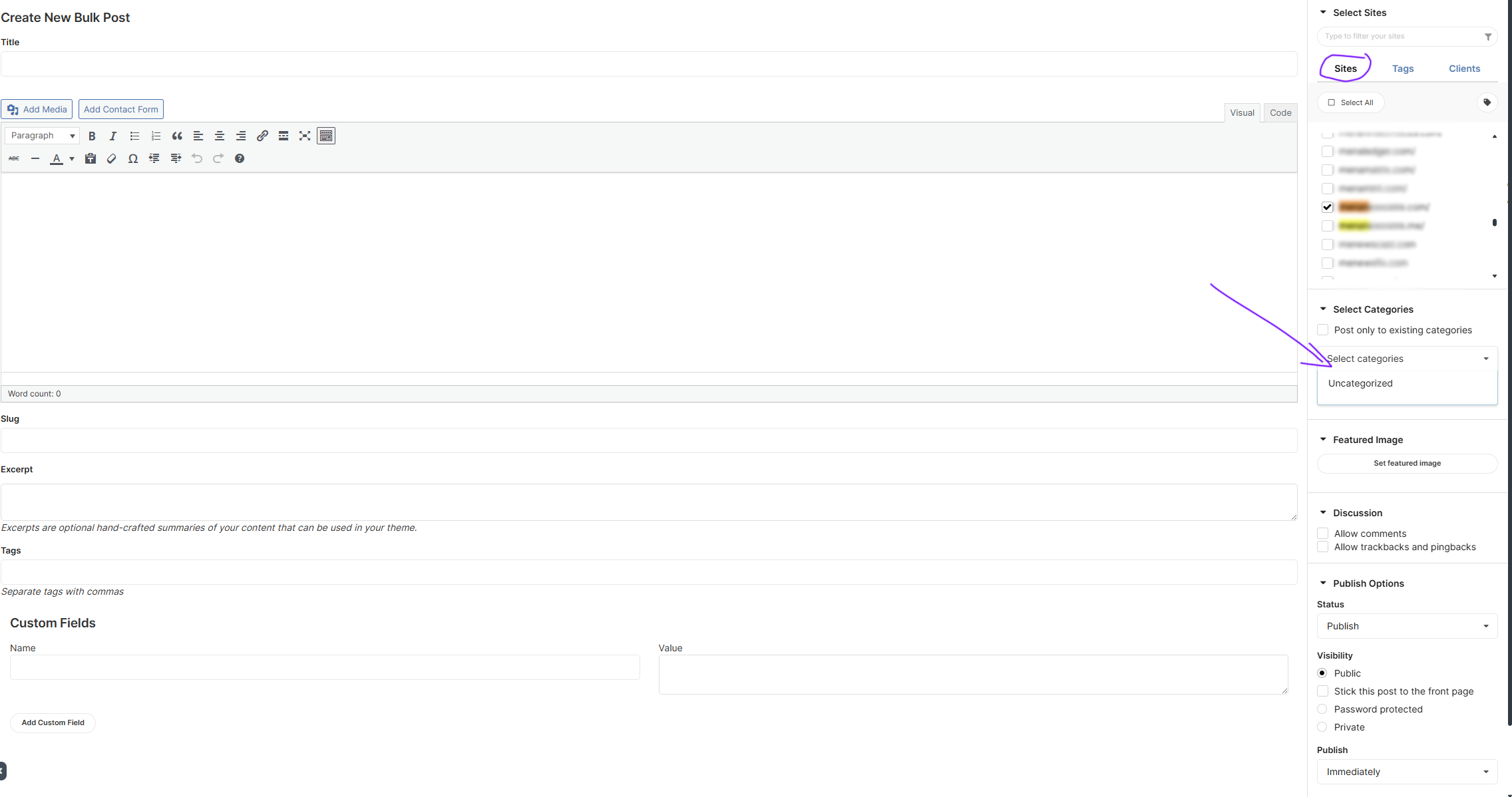
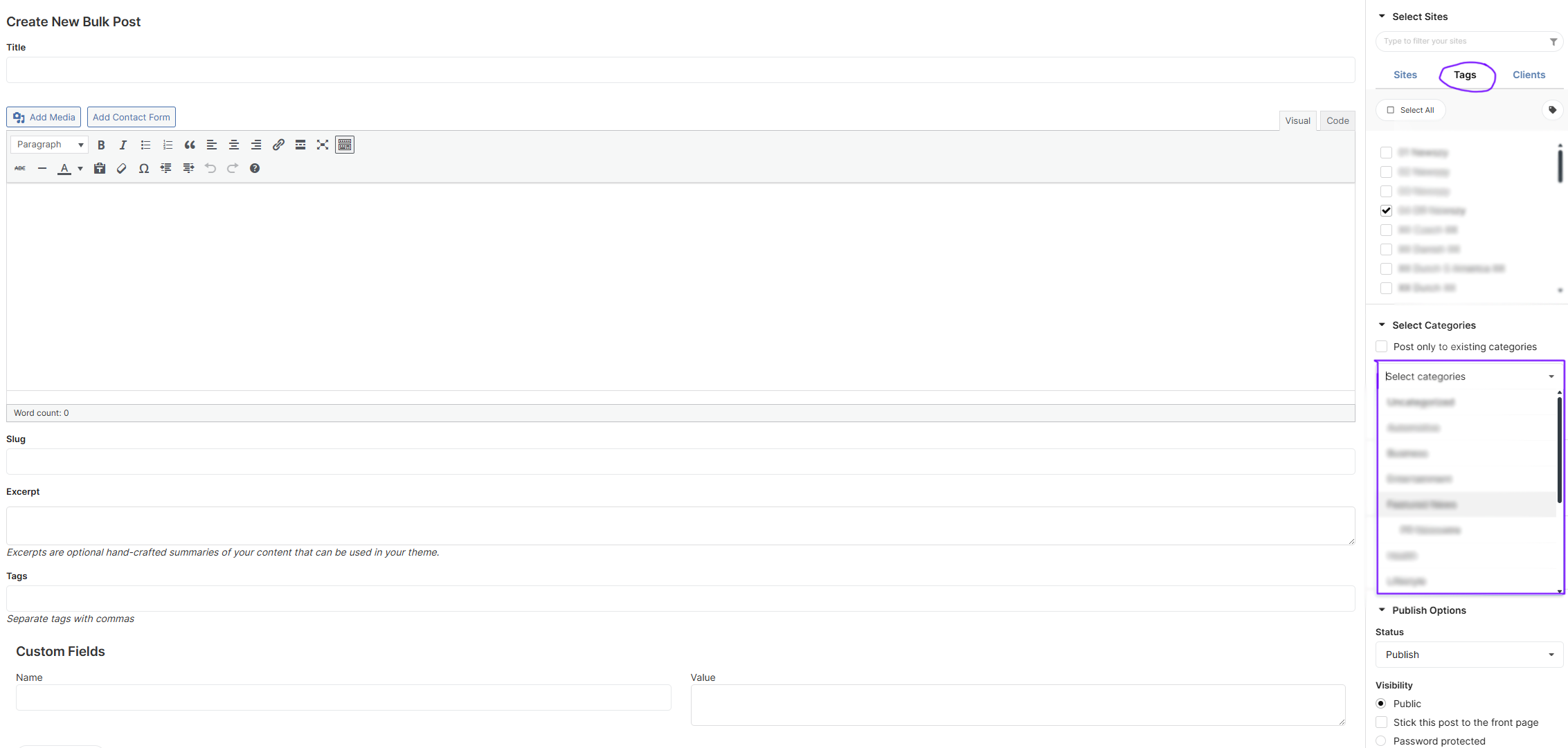
I’m reaching out regarding an issue that started recently (within the last 1–2 days). When publishing posts through the MainWP Dashboard and selecting categories, I’ve noticed an unexpected behavior:
When I select an individual site (as shown in the first screenshot), no categories appear under the Sites tab.
However, when I select a specific tag group that contains the same sites, the categories load normally (as shown in the second screenshot).
This issue is new — I’ve been using MainWP for over two years without experiencing this problem. All plugins, child sites, and the MainWP Dashboard are fully updated and running on the current version.
For reference:
PHP Version: 8.4
Could you please advise on what might be causing this issue or how to resolve it?
FileSystem Method = direct direct Pass
MultiSite Disabled =true true Pass
WordPress Memory Limit >=64M 512M Pass
WordPress Version >=6.2 6.x Pass
PHP Required Detected Status
cURL Extension Enabled =true true Pass
cURL Timeout >=300 seconds 60 Warning
cURL Version >=7.29.0 8.x Pass
Function tmpfile enabled N/A Enabled Pass
OpenSSL Version >=OpenSSL/1.1.0 3.x Pass
OpenSSL Working Status Yes Yes Pass
PCRE Backtracking Limit >=10000 1000000 Pass
PHP Allow URL fopen N/A YES
PHP Disabled Functions N/A None
PHP Exif Support N/A YES
PHP IPTC Support N/A YES
PHP Loaded Extensions N/A (hidden for security)
PHP Max Execution Time >=30 seconds 850 Pass
PHP Max Input Time >=30 seconds 850 Pass
PHP Memory Limit >=256M 512M Pass
PHP Post Max Size >=2M 2047M Pass
PHP Safe Mode Disabled =true true Pass
PHP Session enabled N/A Enabled Pass
PHP Upload Max Filesize >=2M 2047M Pass
PHP Version >=7.4 8.4.x Pass
PHP XML Support N/A YES
SSL Extension Enabled =true true Pass
SSL Warnings = empty Pass
MySQL Required Detected Status
MySQL Client Encoding N/A utf8mb4
MySQL Mode N/A Standard
MySQL Version >=5.0 MariaDB 11.x Pass
Server Configuration Detected Value
(General server information hidden for security)
MainWP Dashboard Settings Detected Value
Abandoned plugins/themes tolerance 365
Cache control enabled No
Enable Uptime Monitoring No
MainWP Dashboard Version Latest: 5.4.1 | Detected: 5.4.0.23 Warning
Maximum number of comments 50
Maximum number of pages to return 150
Maximum number of posts to return 150
Maximum simultaneous install/update requests 3
Maximum simultaneous requests 7
Minimum delay between requests 600
REST API enabled No
Use WP Cron Yes
WP Core advanced automatic updates enabled Yes
Extensions Version Status
MainWP Comments Extension 5.0 Active
MainWP Custom Dashboard Extension 5.0.1 Active
MainWP Database Updater Extension 5.0.4 Active
MainWP Maintenance Extension 5.0 Active
MainWP SSL Monitor Extension 5.0.1 Active
MainWP URL Extractor Extension 5.0 Active
Plugin Version Status
Akismet Anti-spam 5.6 Active
Elementor 3.33.x Active
Jetpack Active Active
MainWP Dashboard 5.4.1 Active
Bluehost Plugin Active Active
I’ve managed to reproduce this issue of categories not showing up in the dropdown.
I passed it along to our dev team, and I’ll update you as soon as we have a fix ready.
The fix for this issue was included in version 5.4.1.1 of the MainWP Dashboard, released on Jan 14, 2026.
Thank you all for reporting this to us.
WordPress® is a registered trademark of the WordPress Foundation, and WooCommerce® is a registered trademark of WooCommerce, Inc. MainWP is an independent product and is not affiliated, associated, or endorsed by the WordPress Foundation, WooCommerce, Inc., or Automattic Inc., except where noted under the Jetpack® API and Trademark License Agreement. All product names, logos, and brands are property of their respective owners and are used for identification purposes only.