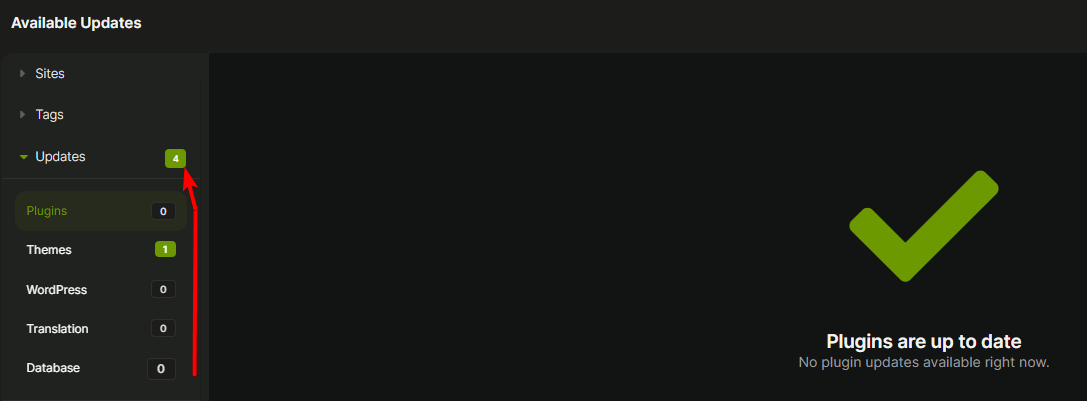
After completing the majority of the available updates, I noticed that the number next to the parent “Updates” stopped updating, showing an incorrect total of available updates. The number remains the same even after I refreshed the page.
Hey @kwsim
1/
Are you perhaps using the MainWP Staging add-on?
2/
Does the issue persist even after a Dashboard sync?
3/
And can you please post the community system report from your MainWP Dashboard for review? The report is located in your Dashboard under Info → Server (your-mainwp-dashboard.com/wp-admin/admin.php?page=ServerInformation), on the top right of the page.
Be sure to use the button like the one below; this button hides all your private information:

Pressing the button auto-copies the report to your clipboard then just paste it in a reply here.
Hey @bojan
1/ The Staging add-on is not installed.
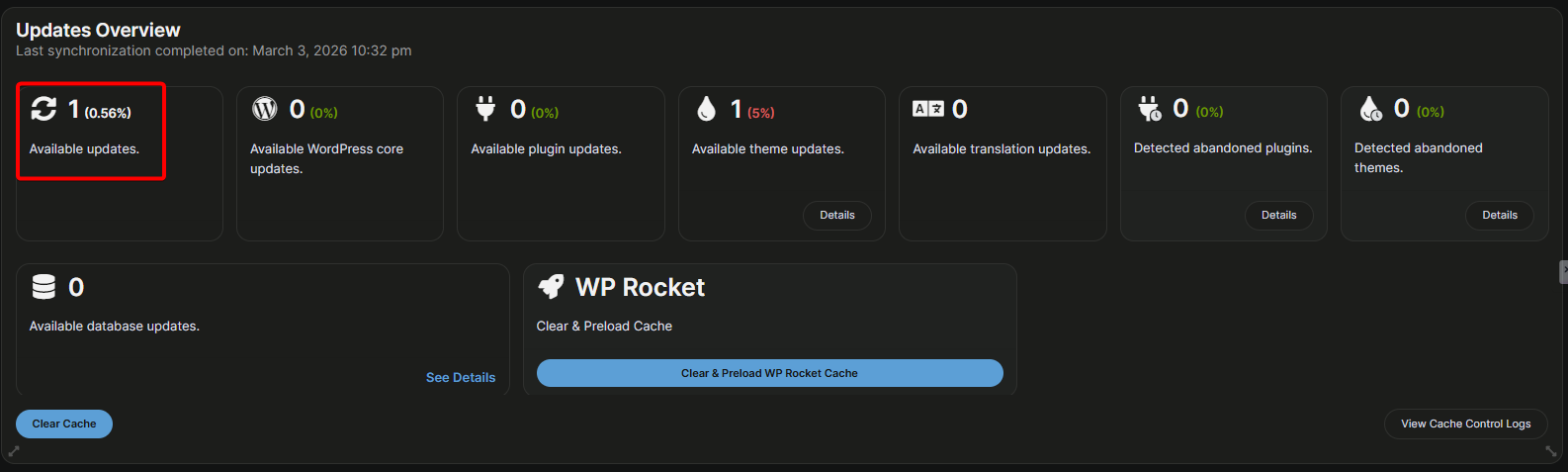
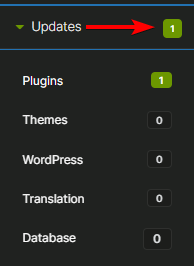
2/ Not sure why this is relevant? I just showed you that the overview page is showing only 1 available update. In any case, I’ve had my dashboard open since I posted this Bug, and now I just noticed that the total available updates is showing the correct number. I did nothing other than go to the Add-ons to confirm that I did not have the Staging add-on installed.
3/ Here is my community system report.
### WordPress Check Required Detected ###
FileSystem Method = direct direct Pass
MultiSite Disabled =true true Pass
WordPress Memory Limit >=64M 256M Pass
WordPress Version >=6.2 6.9.1 Pass
### PHP Required Detected ###
cURL Extension Enabled =true true Pass
cURL Timeout >=300 seconds 300 Pass
cURL Version >=7.29.0 7.61.1 Pass
Function `tmpfile` enabled N/A Enabled Pass
OpenSSL Version >=OpenSSL/1.1.0 OpenSSL/1.1.1k Pass
OpenSSL Working Status Yes Yes Pass
PCRE Backtracking Limit >=10000 1000000 Pass
PHP Allow URL fopen N/A YES
PHP Disabled Functions N/A exec, passthru, shell_exec, system,
PHP Exif Support N/A YES
PHP IPTC Support N/A YES
PHP Loaded Extensions N/A Core, PDO, PDO_ODBC, Phar, Reflection, SPL, SimpleXML, Zend OPcache, bcmath, bz2, calendar, cgi-fcgi, ctype, curl, date, dba, dom, enchant, exif, fileinfo, filter, ftp, gd, gettext, gmp, hash, iconv, imagick, imap, intl, json, ldap, libxml, mbstring, mysqli, mysqlnd, odbc, openssl, pcntl, pcre, pdo_mysql, pdo_pgsql, pdo_sqlite, pgsql, posix, pspell, random, session, shmop, snmp, soap, sockets, sqlite3, standard, sysvmsg, sysvsem, sysvshm, tidy, tokenizer, xml, xmlreader, xmlwriter, xsl, zip, zlib
PHP Max Execution Time >=30 seconds 400 Pass
PHP Max Input Time >=30 seconds 300 Pass
PHP Memory Limit >=256M 512M Pass
PHP Post Max Size >=2M 128M Pass
PHP Safe Mode Disabled =true true Pass
PHP Session enabled N/A Enabled Pass
PHP Upload Max Filesize >=2M 128M Pass
PHP Version >=7.4 8.3.30 Pass
PHP XML Support N/A YES
SSL Extension Enabled =true true Pass
SSL Warnings = empty Pass
### MySQL Required Detected ###
MySQL Client Encoding N/A utf8
MySQL Mode N/A ERROR_FOR_DIVISION_BY_ZERO,NO_AUTO_CREATE_USER,NO_ENGINE_SUBSTITUTION
MySQL Version >=5.0 10.6.25-MariaDB Pass
### Server Configuration Detected Value ###
Accept Content text/html,application/xhtml+xml,application/xml;q=0.9,image/avif,image/webp,image/apng,*/*;q=0.8,application/signed-exchange;v=b3;q=0.7
Accept-Charset Content N/A
Architecture 64 bit
Gateway Interface CGI/1.1
HTTPS ON
Memory Usage 131.29 MB
Operating System Linux
Request Time 1772647324
Server Protocol HTTP/1.0
Server self connect Not expected HTTP response body:
Server Software Apache
User Agent Mozilla/5.0 (Windows NT 10.0; Win64; x64) AppleWebKit/537.36 (KHTML, like Gecko) Chrome/145.0.0.0 Safari/537.36
### MainWP Dashboard Settings ###
Abandoned plugins/themes tolerance 365
Cache control enabled Yes
Enable Uptime Monitoring No
MainWP Dashboard Version Latest: 6.0.2 | Detected: 6.0.2 Pass
MainWP legacy backups enabled No
Maximum number of pages to return 50
Maximum number of posts to return 50
Maximum simultaneous install and update requests3
Maximum simultaneous requests 4
Maximum simultaneous requests per ip1
Maximum simultaneous sync requests 2
Maximum simultaneous uptime monitoring requests (Default: 10)10
Minimum delay between requests 200
Minimum delay between requests to the same ip1000
Number of connected sites 16
Optimize data loading Yes
Plugin advanced automatic updates enabledYes
Primary Backup System WPvivid Backup for MainWP
REST API enabled Yes
Site health monitoring enabled Yes
Theme advanced automatic updates enabledYes
Use WP Cron Yes
WP Core advanced automatic updates enabledYes
### Extensions Version License ###
Dashboard Lock 5.0.3 Active Pass
MainWP Advanced Uptime Monitor Integration5.3.3 Active Pass
MainWP Bulk Settings Manager Extension5.0.4 Active Pass
MainWP Cache Control Extension 5.0.4 Active Pass
MainWP Clone Extension 5.0.1 Active Pass
MainWP Code Snippets Extension 5.0.4 Active Pass
MainWP Custom Dashboard Extension 5.0.1 Active Pass
MainWP Database Updater Extension 5.0.7 Active Pass
MainWP Domain Monitor Extension 5.1.4 Active Pass
MainWP Favorites Extension 5.3 Active Pass
MainWP File Uploader Extension 5.0.2 Active Pass
MainWP Google Analytics Extension 6.0 Active Pass
MainWP Google Search Console Extension6.0 Active Pass
MainWP iThemes Security Extension 5.0.1 Active Pass
MainWP Lighthouse Extension 5.2 Active Pass
MainWP Maintenance Extension 5.0 Active Pass
MainWP Pro Reports Extension 5.0.10 Active Pass
MainWP Regression Testing Extension5.1.4 Active Pass
MainWP SSL Monitor Extension 5.1.3 Active Pass
MainWP URL Extractor Extension 5.0.1 Active Pass
MainWP Vulnerability Checker Extension5.0.4 Active Pass
MainWP White Label Extension 5.0.3 Active Pass
SEOPress 1.5
Termageddon for MainWP 2.5.2 Active Pass
WP Rocket Integration 5.1.6 Active Pass
WPvivid Backup MainWP 0.9.40
### Plugin Version ###
Admin and Site Enhancements (ASE) Pro8.4.2 Active
MainWP Dashboard 6.0.2 Active
MainWP Key Maker 1.3 Active
SEOPress 9.6 Active
SEOPress for MainWP 1.5 Active
SEOPress PRO 9.6 Active
Solid Security Pro 8.7.1 Active
SureMail 1.9.3 Active
WP Compress | MainWP 6.60.17 Inactive
WPvivid Backup MainWP 0.9.40 Active
WPvivid Backup Plugin 0.9.124 Active
WPvivid Plugins Pro 2.2.41 Active
Thanks, @kwsim.
That appears to have been a caching issue. Based on the system report, I see that you don’t have any caching plugins installed, but please check if there is any on the hosting-side. Particularly, object caching.
You can also try decreasing the Browser cache expiration time in the MainWP Advanced Settings (wp-admin/admin.php?page=SettingsAdvanced) if you continue to notice this behavior in the future.
