On the dashboard, at the top, I am getting this message: “The Network Activity database size is too large (301.82 MB). Go to MainWP Settings > Tool > “Delete archived Network Activity data” to delete records if needed.” with Tool as an hyperlink. I clicked, and then click on the button “Delete archived Network Activity data”, got a popup confirmation to delete, I said yes, reload the page. If I go back to the dashboard, the message is still there.
We will be adjusting the messaging in that tooltip as it is a bit confusing right now.
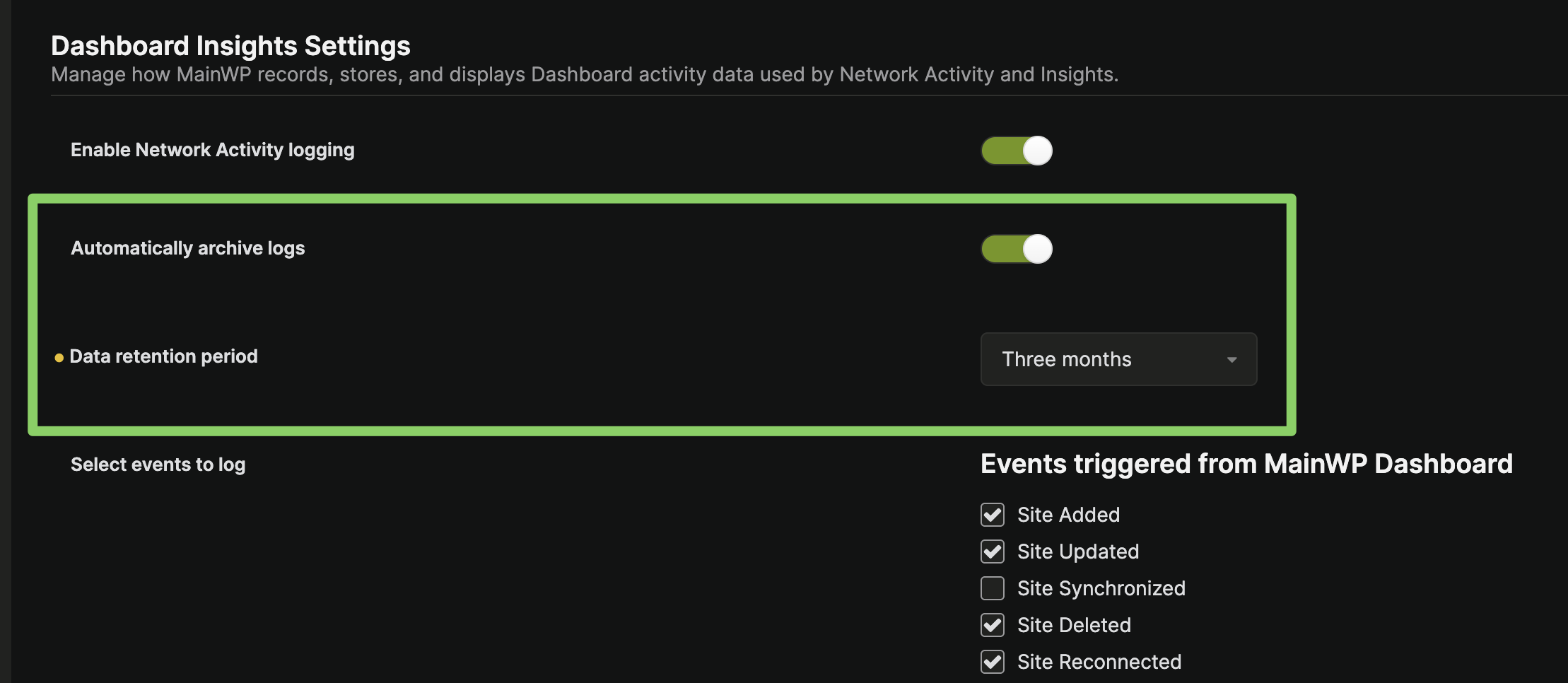
The button “Delete archived Network Activity data” will not delete any logs unless “Automatically archive logs” is enabled on the Network Activity Settings (wp-admin/admin.php?page=SettingsInsights) page.
So first, you would need to enable “Automatically archive logs”, set the “Data retention perdiod”, and then “Delete archived Network Activity data” from the Tools page.
Note that once you enable “Automatically archive logs”, it can take some time for all logs to move to the Archive table if they are in the hundreds of thousands.
Thanks @bojan I switched back to previous version so can’t test it anymore but could be useful for someone else so I will tag as the solution.
WordPress® is a registered trademark of the WordPress Foundation, and WooCommerce® is a registered trademark of WooCommerce, Inc. MainWP is an independent product and is not affiliated, associated, or endorsed by the WordPress Foundation, WooCommerce, Inc., or Automattic Inc., except where noted under the Jetpack® API and Trademark License Agreement. All product names, logos, and brands are property of their respective owners and are used for identification purposes only.