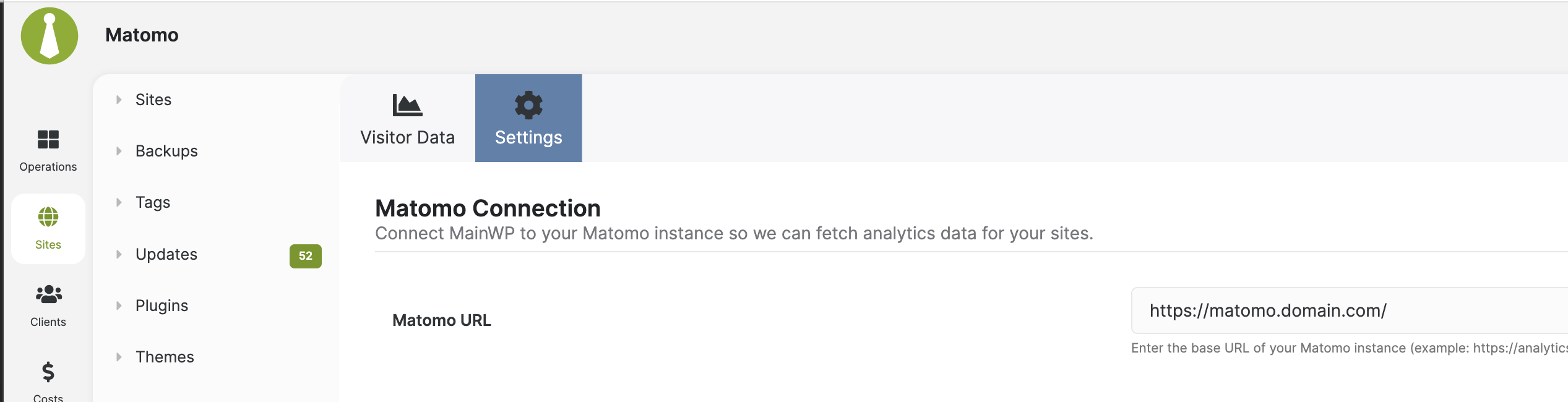
We just updated MainWP, etc on the dashboard site, and we suddenly get an error regarding Matomo, which had been working perfectly before. Please advise how to fix/get this connected again:
The Matomo URL includes a subfolder, which is not supported. Matomo must be reachable at the root of an https:// address, such as https://matomo.example.com/. Put Matomo on its own subdomain, then enter that address in the Matomo URL field and click Save Settings.
Yes, this requirement was introduced in the Matomo 5.2 update. The add-on changed how connections and API tokens are handled and now requires Matomo to be available at the root of an HTTPS address, such as https://matomo.example.com/ .
Earlier versions accepted subfolder addresses, so your existing connection can stop working after this update even though nothing changed in your Matomo setup. Sorry for the disruption this causes.
To reconnect with the current version, Matomo needs to be accessible at an HTTPS address without a subfolder.
Then update Matomo URL under MainWP > Add-ons > Matomo > Settings (/wp-admin/admin.php?page=Extensions-Mainwp-Piwik-Extension&tab=settings ) and click Save Settings .
Simply removing the subfolder from the saved URL will only work if Matomo is actually accessible at that root address.
I’ve logged this for development review to see whether subfolder support can be restored while keeping the Abilities API integration and security improvements.
Could you open MainWP > Add-ons > Matomo > Settings , check that the URL starts with https:// and includes your Matomo subfolder, then click Save Settings ?
If the server and folder haven’t changed, leave the API token blank.
If it still fails, please open a private Help Desk ticket so we can take a closer look.
Please refer to this Community thread by its URL in the ticket.
WordPress® is a registered trademark of the WordPress Foundation, and WooCommerce® is a registered trademark of WooCommerce, Inc. MainWP is an independent product and is not affiliated, associated, or endorsed by the WordPress Foundation, WooCommerce, Inc., or Automattic Inc., except where noted under the Jetpack® API and Trademark License Agreement. All product names, logos, and brands are property of their respective owners and are used for identification purposes only.