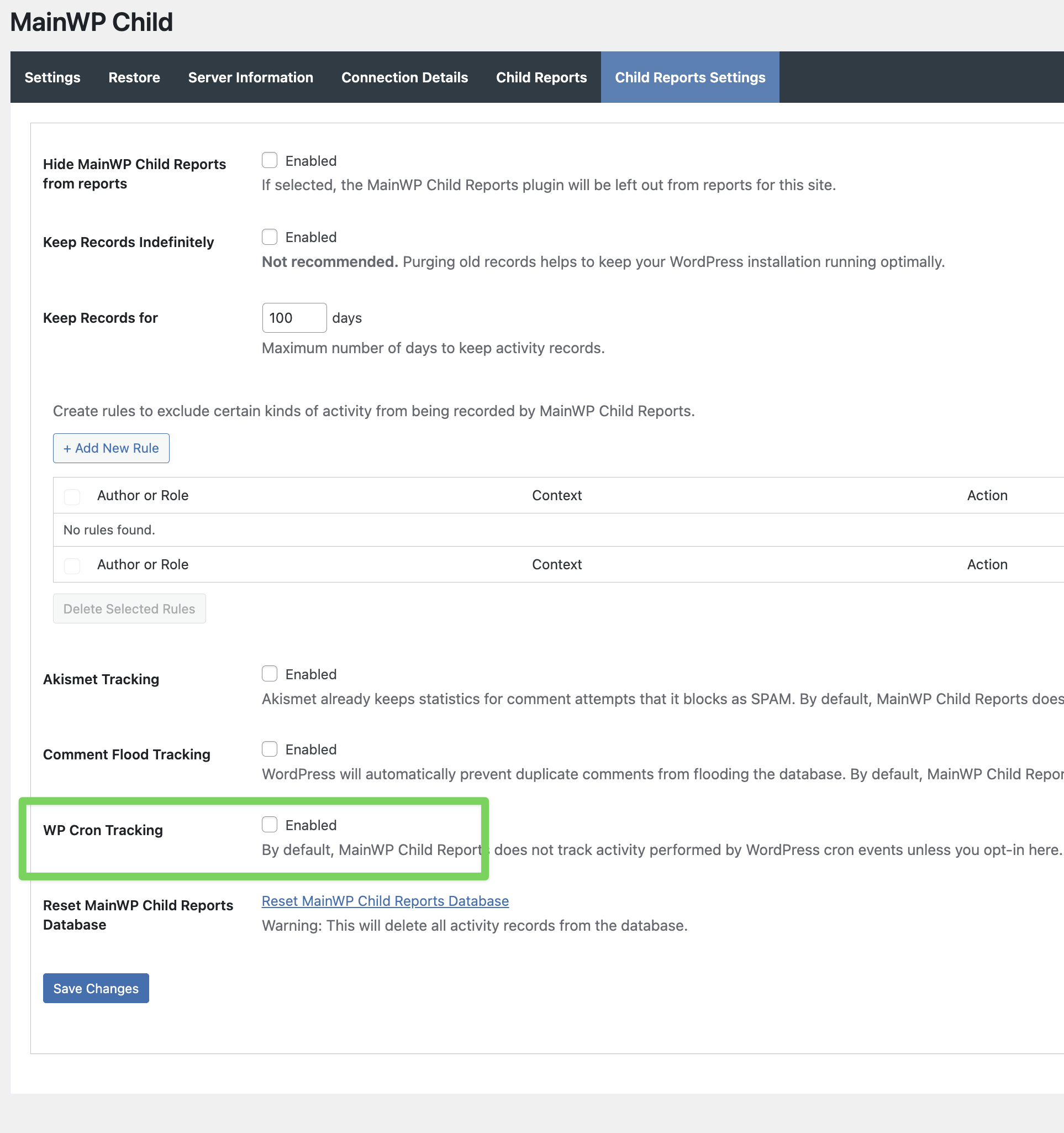
For some reason, the only Solid Security scans that show in my Pro Reports are manual scans. My automated scans do not send results to the Reports for my child sites. I noticed this issue before updating my dashboard to the 5.5 beta1, but even updating I still have the issue. I also found a previous post where it was tied to the child reports plugin, but it was resolved. https://newcom.mainwp.com/t/ithemes-security-pro-no-display-in-the-pro-report/7299/3?u=lb91
Thank you, that fixed the issue, but it also says that enabling this is not recommended for most sites, so should I be concerned about something else by enabling it?
That note just means most sites don’t need to log cron-run events, so we keep it off by default. Enabling it only adds some additional logging so that some scheduled scans show up in reports.
WordPress® is a registered trademark of the WordPress Foundation, and WooCommerce® is a registered trademark of WooCommerce, Inc. MainWP is an independent product and is not affiliated, associated, or endorsed by the WordPress Foundation, WooCommerce, Inc., or Automattic Inc., except where noted under the Jetpack® API and Trademark License Agreement. All product names, logos, and brands are property of their respective owners and are used for identification purposes only.