I have a custom cron job on Runcloud for triggering all my various plugins via a shell script.
I set the SSL and Domain monitor to update weekly.
It runs these files:
/mainwp-ssl-monitor-extension/cron/ssl_monitor_cron_start.php
/mainwp-ssl-monitor-extension/cron/ssl_monitor_cron_continue_run.php
/mainwp-domain-monitor-extension/cron/domain_monitor_cron_start.php
/mainwp-domain-monitor-extension/cron/domain_monitor_cron_continue_run.php
/mainwp-domain-monitor-extension/cron/domain_monitor_cron_alert.php
I have a log showing these are running or at least they are triggered.
Regardless, I still see status like this:
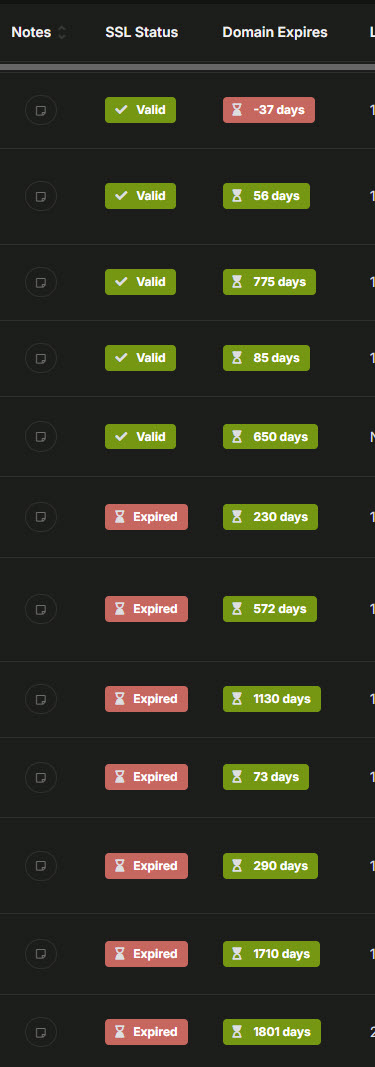
In the plugin settings itself, it is enabled to automatically check, with Once a Week option. Notification threshold 10 days.
Domain monitor is also enabled with once a week and 7 day threshold.
Another bug is that when I add a brand new site, it never seems to check it. I have to check new sites manually first from the SSL/Domain plugin page.
I can only guess that running those files directly isn’t enough to trigger them to work. I did a ton of research to find how to do my own cron job triggers but maybe it’s not right.
My custom cron also triggers other plugins in the same way and they all seem to work.
One of the reasons I set up my own cron is because SSL and Domains wouldn’t check even before I did this so it was suggested to trigger them manually.
Can I get an “official” method to get these plugins to actually work? Ideally with my own CRON, which runs from Runcloud.
Thanks!